Boost MicroPython productivity in VSCode





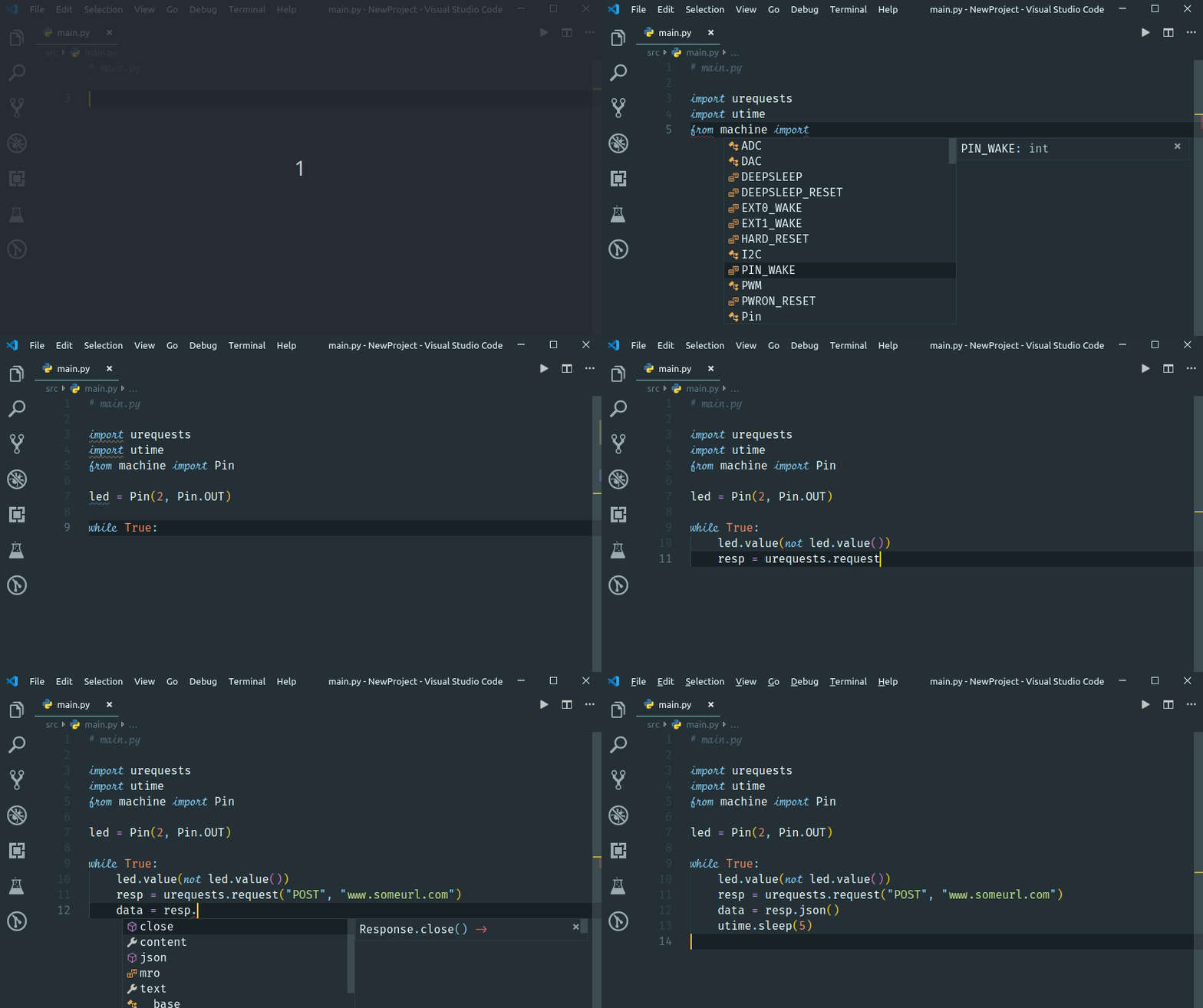
The IntelliSense and code linting that is so prevalent in modern editors, does not work out-of-the-gate for MicroPython projects. While the language is Python, the modules used are different from CPython, and also different ports have different modules and classes, or the same class with different parameters.
Writing MicroPython code in a modern editor should not need to involve keeping a browser open to check for the exact parameters to read a sensor, light-up a LED or send a network request.
Fortunately with some additional configuration and data, it is possible to make the editors understand your flavor of MicroPython, whether you use one of the pre-compiled firmwares, but also if you run a one-off custom firmware version.
 ]
]
In order to achieve this a few things are needed:
- Stub files for the native / enabled modules in the firmware using PEP 484 Type Hints
- Specific configuration of the VS Code Python extensions
- Specific configuration of Pylint [ Optional ]
- Suppression of warnings that collide with the MicroPython principles or code optimization.
Please review the documentation on [https://micropython-stubber.readthedocs.io↗ (opens in a new tab)]
With that in place, VSCode will understand MicroPython for the most part, and help you to write code, and catch more errors before deploying it to your board.
Note that the above is not limited to VSCode and pylint, but it happens to be the combination that I use.
A lot of subs have already been generated and are shared on PyPi, github or pre-installed by a tool, so it is quite likely that you can just grab a copy be be productive in a few minutes.
To install pre-built stubs from PyPI
This section describes how to install the stubs from PyPI, and how to use them in your project. If you want to create or maintain stub - please see the next section.
- Install in a typings folder (recommended)
pip install -U micropython-<port>[-<board>]stubs --no-user --target ./typings - Install in a venv (after activating)
pip install -U micropython-<port>[-<board>]stubs --no-user
Examples:
pip install -U micropython-stm32-stubs

# Install stubs for a specific version.
pip install -U micropython-esp32-stubs==1.20.0.*

# Install stubs for a specific board.
pip install -U micropython-rp2-pico_w-stubs
For more details how to use the stubs please refer to the documentation on RTD↗ (opens in a new tab)
-
The sister-repo MicroPython-stubs↗ (opens in a new tab) contains all stubs↗ (opens in a new tab) I have collected with the help of others, and which can be used directly. That repo also contains examples configuration files that can be easily adopted to your setup.
-
Micropython-stubber uses MPFlash↗ (opens in a new tab) in some of its operations. mpflash was formerly hosted in this repo, but has been moved to its own repo.
Quick start to build stubs
pip install micropython-stubber

cd my_stub_workspace
mkdir all-stubs

# pick a firmware version (tag, stable, preview)
stubber switch stable

# generate doc-based stdlib stubs for the selected version
stubber docstubs --enrich

# capture frozen modules from reference firmware downloads
stubber frozen --version stable --enrich

# merge the pieces for one or more targets
stubber merge --port esp32 --board ESP32_GENERIC --version stable
stubber merge --port rp2 --board RPI_PICO_W --version stable

# build final wheel-style outputs in all-stubs/<port>/<board>
stubber build --port esp32 --board ESP32_GENERIC --version stableswitchlocks the workspace to a MicroPython release before running other commands.docstubspulls documentation-based stubs;frozenadds board-specific frozen modules.mergeandbuildcombine everything into installable stubs underall-stubs/.
Common commands
- List available firmware tags:
stubber switch --list - Create merged stubs for every board of a port:
stubber merge --port esp32 --board all --version stable - Rebuild already downloaded artifacts:
stubber build --port esp32 --board ESP32_GENERIC --version stable - Enrich an existing stub set with docstrings/parameter hints:
stubber docstubs --enrich
Outputs and where to use them
- Generated wheels and folders end up under
all-stubs/<port>/<board>/<version>. - Point your editor type checker (Pyright/Pylance/Mypy) to the
all-stubspath or install the produced wheels into your project virtual environment. - For a full worked example, see the notebook Manual stub build chain.ipynb↗ (opens in a new tab) which mirrors the CLI workflow used above.
Working with Custom MicroPython Builds
If you're working with a fork, branch, or custom build of MicroPython (such as a custom RPi Pico W firmware), see the Custom MicroPython Guide↗ (opens in a new tab) for detailed instructions on how to generate stubs for your specific build.
Developing & testing
This is described in more detail in the developing↗ (opens in a new tab) and testing↗ (opens in a new tab) documents in the docs folder.
Branch Main
The name of the default branch has been changed to main.
If you have cloned this repo before you main need to adjust the local repro to be aware of this, or create a fresh clone.
To update run the below command:
git branch -m master main
git fetch origin
git branch -u origin/main main
git remote set-head origin -a
for more info see Renaming a branch↗ (opens in a new tab)
Licensing
MicroPython-Stubber is licensed under the MIT license, and all contributions should follow this LICENSE↗ (opens in a new tab).
Contributions


This project follows the all-contributors↗ (opens in a new tab) specification. Contributions of any kind welcome!